Agent-native sales prospecting

OKKI Go turns a prospecting brief into a reviewable result

Install one skill in your AI agent, describe the companies and people you need, then inspect structured research before your team decides what to do next.

npx -y @okki-global/okki-go-taroball

Copying places the command in your clipboard. Run it in a terminal to begin installation.

OKKI Go agent workflow canvas from a prospecting brief to a reviewed result
01Define ICP
02Research accounts
03Review contacts
04Export result

From request to evidence

A workflow your team can inspect at every handoff

OKKI Go keeps the brief, research logic, structured output, and review decision visible instead of hiding them behind a black-box sequence.

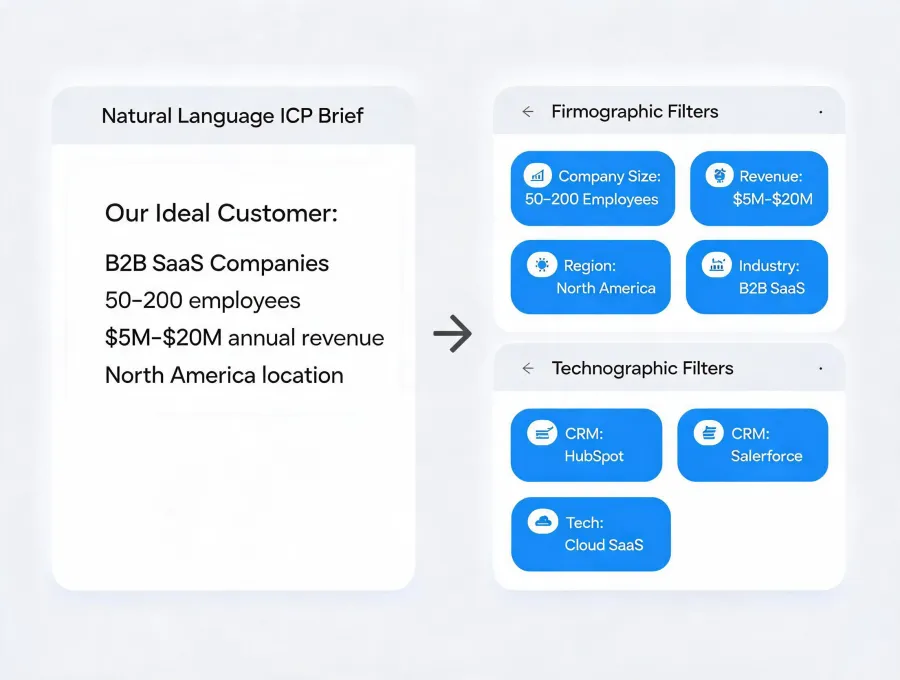
ICP filters translated into an agent research plan
Brief with boundaries

Translate intent into a scoped research plan

Start with the market, account attributes, buyer roles, exclusions, and evidence requirements. The agent can clarify ambiguous criteria before it spends time collecting results.

  • Firmographic and technographic filters stay visible.
  • Exclusions prevent broad, irrelevant lists.
  • The requested output format is agreed before research begins.
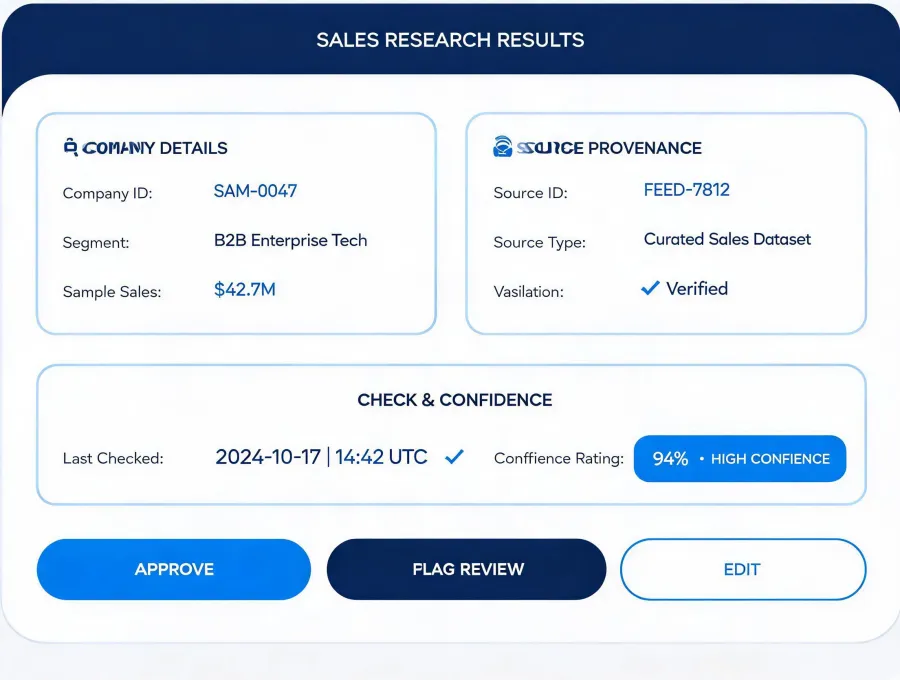
Structured prospect result with source and confidence context
Evidence before action

See why each account or contact appears

A useful result is more than a name. OKKI Go frames findings with source context, recency cues, unresolved fields, and the reason each item matches the original brief.

  • Unknown values remain unknown instead of being guessed.
  • Waterfall enrichment can be evaluated alongside provenance.
  • Human reviewers can remove weak matches before export.
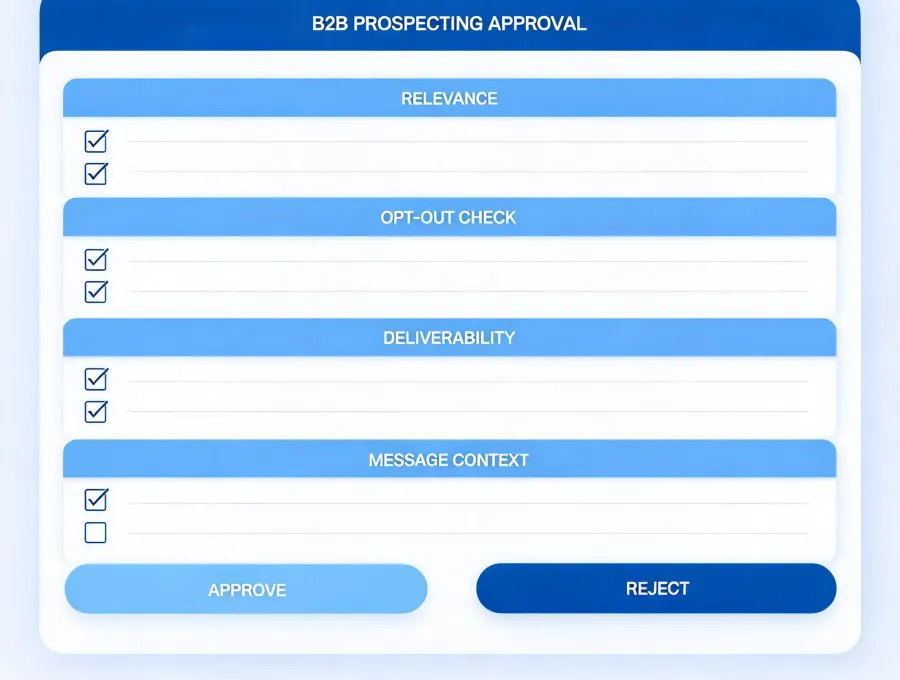
Human review gate before outreach preparation
Review is a state

Keep send decisions under team control

Research and outreach preparation can move quickly without pretending every next action should be autonomous. A visible review gate protects relevance, sender reputation, and regional obligations.

  • Drafting does not equal sending.
  • SPF, DKIM, DMARC, list hygiene, and opt-out handling remain operational responsibilities.
  • Teams choose which approved fields enter downstream systems.

Reproducible tasks

Three briefs, three explicit review gates

These examples describe workflow patterns, not customer claims. Inputs, actions, and outputs remain adjustable to your data sources and operating rules.

For SDR teams

Build a meeting-ready account shortlist

  1. Brief: define territory, segment, trigger, and buyer role.
  2. Agent actions: research accounts and organize contact context.
  3. Review gate: remove weak matches and check freshness.
  4. Output: an approved research table for the next workflow.
For founders

Test a narrow market hypothesis

  1. Brief: describe the problem, company profile, and exclusions.
  2. Agent actions: assemble a small evidence-aware sample.
  3. Review gate: inspect whether examples fit the hypothesis.
  4. Output: a refined ICP and follow-up research questions.
For RevOps

Prepare an enrichment exception queue

  1. Brief: specify required fields and acceptable sources.
  2. Agent actions: identify gaps and compare candidate evidence.
  3. Review gate: approve provenance and field precedence.
  4. Output: a governed update set with unresolved items flagged.
npx -y @okki-global/okki-go-taroball

Built around real operators

One agent skill, different decision contexts

The research contract changes with the person reviewing the work. Scroll through the roles to see where OKKI Go fits without assuming a single universal outbound process.

01

Revenue leaders

Test whether a prospecting motion creates useful evidence before adding another seat-based system.

02

SDR & BDR teams

Reduce tab switching while preserving a checkpoint before contacts or messages move downstream.

03

Founders

Turn an early market thesis into a focused research sample and refine it from real fit signals.

04

RevOps

Define field requirements, source precedence, and exception handling before CRM updates occur.

05

GTM engineers

Inspect runtime permissions, rate limits, data handoffs, and failure states as part of the workflow.

06

Outbound agencies

Keep client criteria separated and document review decisions before any outreach preparation.

Installation is a sequence

Copy, run, configure, then validate a first result

Each state has a different success signal. A copied command is not an installed or configured skill.

  1. 1

    Copy

    Place the exact installer command in your clipboard. Success means only that the text was copied.

    npx -y @okki-global/okki-go-taroball
  2. 2

    Run

    Paste the command into a terminal in the AI-agent environment you control. Read the package output and stop if the requested action is unexpected.

    Success signal: the installer completes without an unresolved package or permission error.
  3. 3

    Configure

    Add only the credentials and data connections needed for your workflow. Store API keys using your runtime's secret-management method, not in prompts or shared files.

    Success signal: required connections respond within their documented scopes.
  4. 4

    First result

    Run a narrow sample brief, inspect provenance and unresolved fields, then approve or reject the result before scaling the task.

    Success signal: a reviewer can explain why each retained item fits the brief.

Trust through disclosure

Evaluate behavior, not an invented badge wall

Deployment details depend on the runtime and connections you choose. Verify package behavior and provider terms in your own environment before production use.

Data sources

Config-dependent

Source selection, field coverage, refresh cadence, and waterfall logic depend on configured providers. Keep provenance with each result.

API keys

Config-dependent

Use scoped credentials and your runtime's secret store. Do not paste secrets into a prompt, output table, or shared repository.

Runtime behavior

Verify locally

Review the package actions, network access, update path, and requested permissions in the environment where you install it.

Retention & deletion

Config-dependent

Retention follows your chosen runtime, providers, exports, and downstream systems. Document deletion responsibilities before handling production data.